
Introduction
Welcome to the iSpeech Inc. Application Programming Interface (API) Developer Guide. This guide describes the available variables, commands, and interfaces that make up the iSpeech API.
The iSpeech API allows developers to implement Text-To-Speech (TTS) and Automated Voice Recognition (ASR) in any Internet-enabled application.
The API’s are platform agnostic which means any device that can record or play audio that is connected to the Internet can use the iSpeech API.
Minimum Requirements
Below are the minimum requirements needed to use the iSpeech API. The API can be used with and without a software development kit (SDK).
Internet Connection
iSpeech services require an Internet connection.
HTTP Protocol
The iSpeech API follows the HTTP standard by using GET and POST. Some web browsers limit the length of GET requests to a few thousand characters.
Request/Responses
Requests can be in URL-encoded, JSON, or XML data formats. You can specify the output data format of responses. For TTS, binary data is usually returned if the request is successful. For speech recognition, URL-encoded text, JSON, or XML can be returned by setting the output variable.
API Key
An API key is a password that is required for access. To obtain an API key please visit: http://www.ispeech.org/developers and register for a developer account.
API Features
You can retrieve the properties of your API keys. Key information includes a voice list, amount of credits, locales, and many other parameters.
Text to Speech
You can synthesize spoken audio through iSpeech TTS in a variety of voices, formats, bitrates, frequencies, and playback speeds. Math markup language (MathML) and Speech synthesis markup language (SSML) are also supported.
Automated Speech Recognition
You can convert spoken audio to text using a variety of languages and recognition models. We can create custom recognition models to improve recognition quality.
Position Markers
You can get the position in time when words are spoken in TTS audio.
Visemes
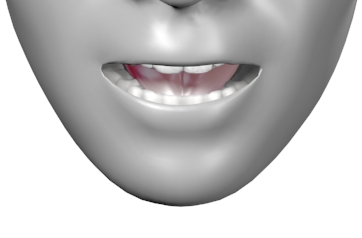
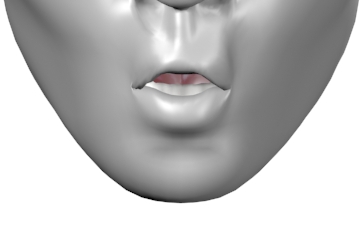
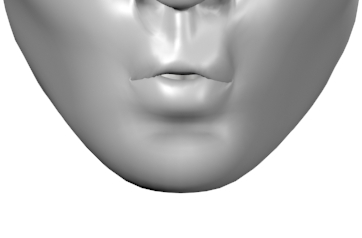
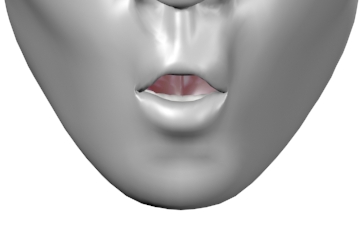
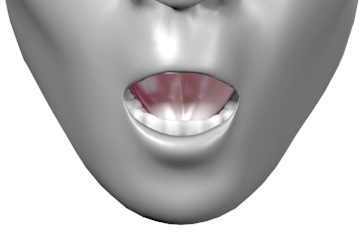
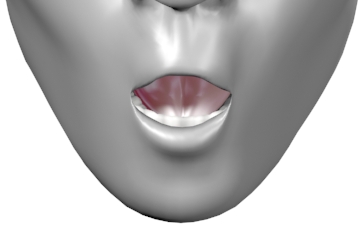
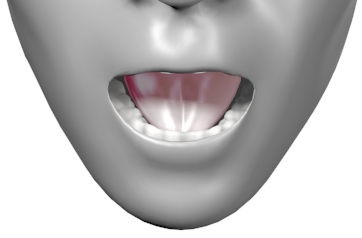
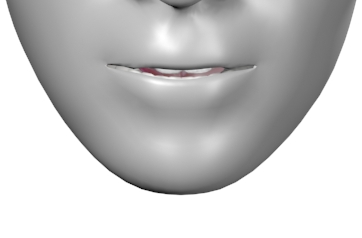
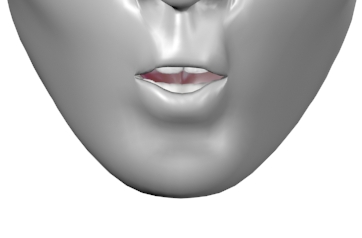
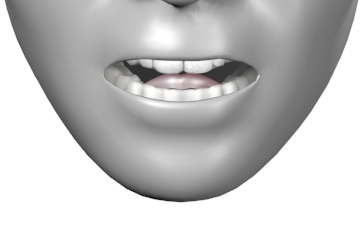
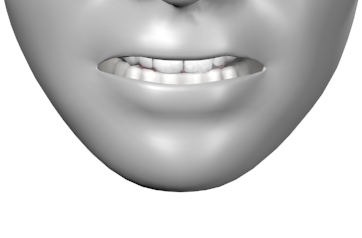
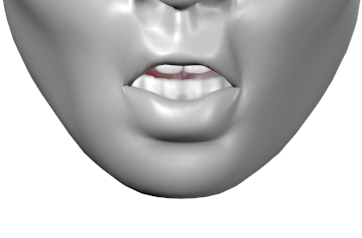
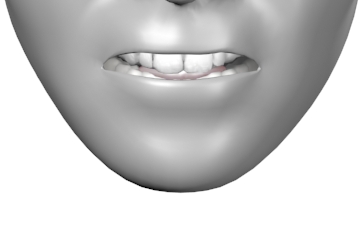
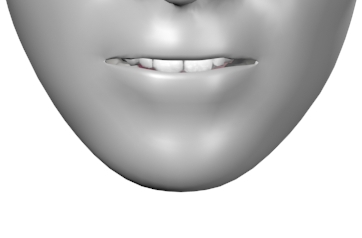
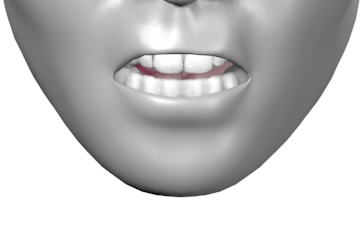
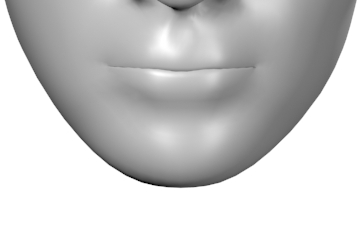
You can get the position in time of mouth positions when words are spoken in TTS audio.
Developer Support
Sales
Automated purchasing system: https://www.ispeech.org/developer/purchase/ iSpeech sales can be contacted at the following phone number: +1-917-338-7723 from 10 AM to 6 PM Eastern Time, Monday to Friday. You can also email sales@ispeech.org.
Support / Troubleshooting
Please contact our support team at support@ispeech.org .
Software Development Kits
iSpeech SDKs simplify the iSpeech API. You should use iSpeech SDKs if the option is available. Only mobile SDKs made by iSpeech allow you to use the iSpeech API for free.
Availability
iPhone, Android, BlackBerry, .NET, Java (Server), PHP, Flash, Javascript/Flash, Ruby, Python, Perl
API Access Pricing
| Platforms | Price |
|---|---|
| iPhone, Android, BlackBerry | Free with fair usage using iSpeech SDK for non-revenue generating apps. Apps must follow the iSpeech standard usage guidelines for branding. |
| .NET, Java, PHP, Flash, Ruby, Python, Perl | Between $0.05 and $0.0001 per word (TTS) or transaction (ASR), depending on quantity |
Authentication
API Key
API Key Information Retrieval
curl "http://api.ispeech.org/api/rest?apikey=**YOUR_KEY_HERE**
&action=information&output=rest"
HTTP Response
[…]&voice-locale-94-1=ja&voice-locale-94-2=ja-jp&voice-gender-94=female
&voice-description-94=Japanese+Female+Voice&wordlimit=40&model=assistant%2cdate
%2cnfl%2cnba%2cusmoney%2cmlb%2cnumbersto9%2cnumbersto99%2cnumbersto999%2ctime
%2cphonenumber%2cstreets%2csportsteam%2ccitystate&credits=5672606&unlimited=enabled
&alias=enabled&asr-sms=enabled&asr-voicemail=enabled&asr-dictation=enabled
An API key is a password that is required for access. To obtain an API key please visit: http://www.ispeech.org/developers and register for a developer account.
View/Edit Keys
Manage your API keys by using the iSpeech developer website . You can request additional features for your API keys on that website.
Request Parameter Reference
| Parameter | Data Type | Example Value |
|---|---|---|
| Apikey | 32 character hex integer | YOUR_KEY_HERE |
Transaction Types
The iSpeech API supports URL Encoded, XML, and JSON formats.
Supported transaction types
| Transaction Type | Input Format | URL |
|---|---|---|
| HTTP GET/POST | URL Encoded | http://api.ispeech.org/api/rest |
| HTTP GET/POST | XML | http://api.ispeech.org/api/xml |
| HTTP GET/POST | JSON | http://api.ispeech.org/api/json |
Request Parameters
| Parameter | Supported Values |
|---|---|
| output (optional) | xml, json, rest (default) |
Text to Speech
Example HTTP GET Request (Using most variables)
curl "http://api.ispeech.org/api/rest?action=convert
      &text=something
      &voice=usenglishfemale
      &format=mp3
      &frequency=44100
      &bitrate=128
      &speed=1
      &startpadding=1
      &endpadding=1
      &pitch=110
      &filename=myaudiofile"
The iSpeech Text-To-Speech API allows you to synthesize high-quality spoken audio in multiple formats. The iSpeech API doesn’t use callbacks because it’s fast and synchronous. You’ll always receive audio data or an error message in the same HTTP transaction.
Request Parameters
| Parameter | Data Type | Example Value |
|---|---|---|
| Action | String | convert, ssml |
| Text | String | Hello World |
| Ssml (optional) | String | <?xml version=”1.0” ?><speak version= […] |
| Voice (optional) | String | usenglishfemale (default) |
| Format (optional) | String | mp3 (default) |
| Frequency (optional) | Integer (hertz) | 16000 (default) |
| Bitrate (optional) | Integer (kbps) | 48 (default) |
| Speed (optional) | Integer | -10 to 10 (default: 0) |
| Startpadding (optional) | Integer (seconds) | 5 (default: 0) |
| Endpadding (optional) | Integer (seconds) | 5 (default: 0) |
| Pitch (optional) | Integer | 0 to 200 (default: 100) |
| Bitdepth (optional) | Integer (bits per sample) | 8 or 16 (default: 16) |
| Filename (optional) | String | myaudio or myaudio.mp3 (default: rest.*) |
| Library (optional) | String | libmath |
Voices - Standard
HTTP GET Request (Setting voice to European French Female)
curl "http://api.ispeech.org/api/rest?action=convert
      &text=something
      &format=mp3
      &voice=eurfrenchfemale"
| Name | Alias |
|---|---|
| US English Female (default) | usenglishfemale |
| US English Male | usenglishmale |
| UK English Female | ukenglishfemale |
| UK English Male | ukenglishmale |
| Australian English Female | auenglishfemale |
| US Spanish Female | usspanishfemale |
| US Spanish Male | usspanishmale |
| Chinese Female | chchinesefemale |
| Hong Kong Cantonese Female | hkchinesefemale |
| Taiwan Chinese Female | twchinesefemale |
| Japanese Female | jpjapanesefemale |
| Korean Female | krkoreanfemale |
| Canadian English Female | caenglishfemale |
| Hungarian Female | huhungarianfemale |
| Brazilian Portuguese Female | brportuguesefemale |
| European Portuguese Female | eurportuguesefemale |
| European Portuguese Male | eurportuguesemale |
| European Spanish Female | eurspanishfemale |
| European Spanish Male | eurspanishmale |
| European Catalan Female | eurcatalanfemale |
| European Czech Female | eurczechfemale |
| European Danish Female | eurdanishfemale |
| European Finnish Female | eurfinnishfemale |
| European French Female | eurfrenchfemale |
| European French Male | eurfrenchmale |
| European Norwegian Female | eurnorwegianfemale |
| European Dutch Female | eurdutchfemale |
| European Polish Female | eurpolishfemale |
| European Italian Female | euritalianfemale |
| European Italian Male | euritalianmale |
| European Turkish Female | eurturkishfemale |
| European Turkish Male | eurturkishmale |
| European German Female | eurgermanfemale |
| European German Male | eurgermanmale |
| Russian Female | rurussianfemale |
| Russian Male | rurussianmale |
| Swedish Female | swswedishfemale |
| Canadian French Female | cafrenchfemale |
| Canadian French Male | cafrenchmale |
| Arabic Male | arabicmale |
Voices - Custom
Custom Voices may be enabled for your account. They can be found in the developer portal -> api key properties -> custom voices. You can use them by setting the variable voice to the custom alias.
| Name | Alias |
|---|---|
| President Obama | Obama (voice=obama) |
| Custom Voice | customvoice1 (voice=customvoice1) |
Voices - List Retrieval
HTTP GET Network Transaction to get XML voice list.
curl "http://api.ispeech.org/api/rest?action=information&output=xml"
XML Response
<?xml version='1.0'?>
<data>
    <result>success</result>
    <voice-1>krkoreanfemale</voice-1>
    <voice-locale-1-1>ko-kr</voice-locale-1-1>
    <voice-locale-1-2>ko</voice-locale-1-2>
    <voice-gender-1>female</voice-gender-1>
    <voice-description-1>Korean Female Voice</voice-description-1>
    <voice-2>usenglishfemale</voice-2>
    <voice-locale-2-1>en-us</voice-locale-2-1>
    <voice-locale-2-2>en</voice-locale-2-2>
    <voice-gender-2>female</voice-gender-2>
    <voice-description-2>United States English Female Voice</voice-description-2>
</data>
JSON Response
{"voice-gender-48":"female","voice-locale-22-1":"fr-ca","voice-locale-8-1":"pt-br","voice-description-2":"Finnish Female Voice","voice-description-3":"Hong Kong Chinese Male Voice","voice-58":"eurdanishfemale","voice-description-1":"Korean Female Voice","voice-description-6":"Chinese Female Voice","voice-description-7":"United Kingdom English Female Voice"}REST / URL Encoded Response
curl "http://api.ispeech.org/api/rest?result=success
      &voice-1=krkoreanfemale2
      &voice-locale-1-1=ko-kr
      &voice-gender-1=female
      &voice-description-1=Korean+Female+Voice
      &voice-2=eurfinnishfemale
      &voice-locale-2-1=fi-fi
      &voice-gender-2=female
      &voice-description-2=Finnish+Female+Voice
      &voice-3=chchinesemale1
      &voice-locale-3-1=zh
      &voice-locale-3-2=zh-hk
      &[...more voices...]"
A current list of voices that are enabled for an API key can be retrieved in REST, JSON, and XML format by using the following service. HTTP GET and POST are supported. A web browser or a REST client can be used to make these HTTP requests.
Speed
HTTP GET Request (Setting speed to 5)
curl "http://api.ispeech.org/api/rest?action=convert
      &text=something
      &voice=usenglishfemale
      &format=mp3
      &speed=5"
Most voices support speed controls.
| Speed | Value (Integer) |
|---|---|
| Fastest | 10 |
| Faster | Speed > 0 |
| Normal (default) | 0 |
| Slower | Speed < 0 |
| Slowest | -10 |
Bitrates
HTTP GET Request (Setting bitrate to 16 kilobits per second)
curl "http://api.ispeech.org/api/rest?action=convert
      &text=something
      &voice=usenglishfemale
      &format=mp3
      &bitrate=16"
Note: Bitrates can only be selected for MP3s.
Valid values are 16, 24, 32, 48 (default), 56, 64, 80, 96, 112, 128, 144, 160, 192, 224, 256, or 320. Bitrates are listed in kilobits per second.
Formats
Example HTTP GET Request (Setting format to wav)
curl "http://api.ispeech.org/api/rest?action=convert
      &text=something
      &voice=usenglishfemale
      &format=wav"
| Name | Extension |
|---|---|
| Audio Interchange File Format | aiff |
| MPEG Layer 3 (default) | mp3 |
| Ogg Vorbis | ogg |
| Windows Media Audio | wma |
| Free Lossless Audio Codec | flac |
| Wave PCM | wav |
| Wave (alaw) | alaw |
| Wave (µ-law) | ulaw |
| Dialogic ADPCM | vox |
| MPEG-4 | mp4 |
Frequencies
Example HTTP GET Request (Setting frequency to 16000 Hz)
curl "http://api.ispeech.org/api/rest?action=convert
      &text=something
      &voice=usenglishfemale
      &frequency=16000"
Possible values: 8000, 11025, 16000 (default), 22050, 24000, 32000, 44100, 48000 cycles per second (Hertz)
Padding
Padding adds silence to a section of the audio file.
Start Padding
Example HTTP GET Request (Setting start padding to 3 seconds)
curl "http://api.ispeech.org/api/rest?action=convert
      &text=something
      &voice=usenglishfemale
      &startpadding=3"
Adds a period of silence to the beginning of the audio file.
End Padding
Example HTTP GET Request (Setting end padding to 3 seconds)
curl "http://api.ispeech.org/api/rest?action=convert
      &text=something
      &voice=usenglishfemale
      &endpadding=3"
Adds a period of silence to the beginning of the audio file.
Pitch
Example HTTP GET Request (Setting pitch to 50)
curl "http://api.ispeech.org/api/rest?action=convert
      &text=something
      &voice=usenglishfemale
      &pitch=50"
Possible values: 0 to 200 (integer), 0 is lowest pitch, 100 is default, 200 is highest pitch. Pitch is enabled only on some voices.
Bit Depth
Example HTTP GET Request (Setting bit depth to 8)
curl "http://api.ispeech.org/api/rest?action=convert
      &text=something
      &voice=usenglishfemale
      &format=wav
      &bitdepth=8"
The bit depth is amount of audio detail for each audio sample.
Possible values are 8 and 16 (default) bits/sample on AIFF, FLAC, and WAVE file formats.
Filename
Example HTTP GET Request (Setting filename of audio)
curl "http://api.ispeech.org/api/rest?action=convert
      &text=something
      &voice=usenglishfemale
      &format=wav
      &filename=myaudiofile"
The filename is the name of the audio file that will download. Specifying the extension is optional. If the extension is missing, the correct extension will be added automatically. The default is rest.[extension], for example: rest.mp3.
Speech Synthesis Markup Language (SSML)
Example HTTP GET Request (Emphasis added on the word big)
curl "http://api.ispeech.org/api/rest?
      action=ssml&ssml=%3C%3Fxml%20version%3D%221.0%22%3F%3E%3Cspeak
      %20version%3D%221.0%22%20xmlns%3D%22http%3A%2F%2Fwww.w3.org
      %2F2001%2F10%2Fsynthesis%22%20xmlns%3Axsi%3D%22http%3A%2F%2F
      www.w3.org%2F2001%2FXMLSchema-instance%22
      %20xsi%3AschemaLocation%3D%22http%3A%2F%2Fwww.w3.org%2F2001
      %2F10%2Fsynthesis%20http%3A%2F%2Fwww.w3.org%2FTR%2Fspeech-synthesis
      %2Fsynthesis.xsd%22%20xml%3Alang%3D%22en-US%22%3E
      That%20is%20a%20%3Cemphasis%3E%20big%20%3C%2Femphasis%3E%20car!
      %3C%2Fspeak%3E"
Response
SSML used:

<?xml version="1.0"?>
<speak version="1.0" xmlns="http://www.w3.org/2001/10/synthesis"
         xmlns:xsi="http://www.w3.org/2001/XMLSchema-instance"
         xsi:schemaLocation="http://www.w3.org/2001/10/synthesis
                   http://www.w3.org/TR/speech-synthesis/synthesis.xsd"
         xml:lang="en-US">
  That is a <emphasis> big </emphasis> car!
</speak>
Audio synthesized as, “That is a BIG car!”.
SSML tags are used to customize the way a text-to-speech engine creates audio. The tags can be used to add pauses, change emphasis, and change pronunciation. This option is disabled by default but can be requested by emailing sales@ispeech.org. The parameter “action” must set to “ssml” and the parameter “ssml” must be set to a complete SSML XML statement.
The parameter “text” is not used and the parameters voice and speed should be represented using the “voice” and “prosody” SSML tags instead of request parameters.
More information on SSML can be found at: http://www.w3.org/TR/speech-synthesis/.
Math Markup Language (MathML)
curl "http://api.ispeech.org/api/rest?action=convert
      &library=libmath
      &text=%3Cfmath%3E%3Cmrow%3E%3Cmtext%3E%3Csup%3E%2B%3C%2Fsup%3E%3C%2Fmtext%3E
      %3Cmn%3E7%3C%2Fmn%3E%3C%2Fmrow%3E%3C%2Ffmath%3E"
Response
MathML used: <mrow><mtext><sup>+</sup></mtext><mn>7</mn></mrow>

Audio synthesized as, “positive 7” instead of plus 7.
MathML tags are used to display and represent mathematical statements. This option is disabled by default but can be requested by emailing sales@ispeech.org.
Remember to set “library” to “libmath” so that the MathML processor loads your text as MathML.
More information on MathML can be found at: https://developer.mozilla.org/en-US/docs/MathML
The following table lists MathML tags supported by the iSpeech API.
| MathML Tag | Purpose |
|---|---|
| mfrac | Used to display fractions |
| mi | Rendered as an identifier such as function names, variables or symbolic constants. |
| mn | A numeric literal which is normally a sequence of digits with a possible separator (a dot or a comma). However, it is also allowed to have arbitrary text in it which is actually a numeric quantity, for example “eleven”. |
| mo | An operator in a broad sense. Besides operators in strict mathematical meaning, this element also includes “operators” like parentheses, separators like comma and semicolon, or “absolute value” bars. |
| mroot |
Displays roots with an explicit index. Two arguments are accepted, which leads to the syntax:
<mroot>
base index
</mroot>
.
|
| mrow |
Groups sub-expressions, which usually contain one or more operators with their respective operands (such as
<mi>
and
<mn>
). This element renders as a horizontal row containing its arguments.
|
| msqrt |
Displays square roots (no index is displayed). The square root accepts only one argument, which leads to the following syntax:
<msqrt>
base
</msqrt>
.
|
| msup, sup | Attaches a superscript to an expression. |
| mtext | Renders arbitrary text with no notational meaning, such as comments or annotations. |
| mspan, span | Used for highlighting text or just general styling of an equation |
| mtable, table |
Creates tables or matrices. Inside a
<mtable>
, only
<mtr>
and
<mtd>
elements may appear. These elements are similar to
<table>
,
<tr>
and
<td>
elements of HTML.
|
Example Transactions
HTTP POST URL encoded request for Text to Speech
curl -X POST -d "action=convert&text=hello+world" "http://api.ispeech.org/api/rest"
HTTP POST JSON request for Text to Speech
curl -X POST -H "Content-Type:application/json"
    -d '{"action":"convert","text":"hello world","voice":"usenglishfemale"}'
    "http://api.ispeech.org/api/json"
HTTP POST XML request for Text to Speech
curl -X POST -H "Content-Type:application/xml"
-d "<data>
    <apikey>developerdemokeydeveloperdemokey</apikey>
    <action>convert</action>
    <text>hello world</text>
    <voice>usenglishfemale</voice>
    </data>" "http://api.ispeech.org/api/xml"
HTTP Response
[mp3 audio binary data]
Example of a text-to-speech network transaction with an error. Responses with an error message return HTTP status response code “HTTP/1.0 202 Accepted”.
curl "http://api.ispeech.org/api/rest?action=convert
      &text=something
      &output=rest
      &voice=usenglishfemale"
Response
result=error&code=8&message=Invalid+voice
The following examples are packet captures from TCP connections that used the HTTP protocol. You can compare your network traffic to these transactions to debug code. Wireshark can be used to analyze network connections. A REST client can be used to make these HTTP requests.
Example network transactions containing MathML
HTTP GET, URL Encoded Request and Reply, +7 (says positive 7)
curl "http://api.ispeech.org/api/rest?action=convert
      &voice=usenglishfemale
      &library=libmath
      &format=mp3
      &text=%3Cfmath%3E%3Cmrow%3E%3Cmtext%3E%3Csup%3E%2B%3C%2Fsup%3E%3C%2Fmtext%3E
      %3Cmn%3E7%3C%2Fmn%3E%3C%2Fmrow%3E%3C%2Ffmath%3E"
HTTP POST JSON Text-to-Speech request containing MathML
curl -X POST -H "Content-Type:application/json"
  -d '{"action":"convert",
  "text":"<mrow><mtext><sup>-</sup></mtext><span mtagname=\"mfrac\">
  <span class=\"fm-vert fm-frac\">
  <table><tbody>
  <tr><td class=\"fm-num-frac fm-inline\"><mn>3</mn></td></tr>
  <tr><td class=\"fm-den-frac fm-inline\"><mn>5</mn></td></tr>
  </tbody></table>
  </span></span></mrow>",
  "voice":"usenglishfemale",
  "library":"libmath"}' "http://api.ispeech.org/api/json"
HTTP POST XML Text-to-Speech request containing MathML (The text: “+7” gets spoken as “positive seven”)
curl -X POST -H "Content-Type:application/xml"
-d "<data>
<action>convert</action>
<text><msup><mn>10</mn><span class="fm-script fm-inline"><mn>3</mn></span></msup></text>
<library>libmath</library>
<voice>usenglishfemale</voice>
</data>" "http://api.ispeech.org/api/xml"
> Response
```shell
[...mp3 binary data...]
The following examples are packet captures from TCP connections that used the HTTP protocol. You can compare your network traffic to these transactions to debug code. Wireshark can be used to analyze network connections. A REST client can be used to make these HTTP requests.
More information on MathML is available on http://www.w3.org/TR/MathML2/ and https://developer.mozilla.org/en-US/docs/MathML
HTTP GET URL encoded Text-to-Speech request containing MathML
| URL encoded Request Information |
|---|
| Text: “+7” (says, positive seven) |
MathML used:
<mrow><mtext><sup>+</sup></mtext><mn>7</mn></mrow>
|
| POST JSON Request Information |
|---|
| Text: “-3/5” (says, negative three fifths) |
MathML used:
<mrow><mtext><sup>-</sup></mtext><span mtagname="mfrac"><span class="fm-vert fm-frac"><table><tbody><tr><td class="fm-num-frac fm-inline"><mn>3</mn></td></tr><tr><td class="fm-den-frac fm-inline"><mn>5</mn></td></tr></tbody></table></span></span></mrow>
|
| POST XML Request Information |
|---|
| Text: “10^3” (says, 10 to the power of 3) |
Math ML:
<msup><mn>10</mn><span class="fm-script fm-inline"><mn>3</mn></span></msup>
|
Errors
| Code | Summary |
|---|---|
| 1 | Invalid API key |
| 2 | Could not convert text |
| 3 | Not enough credits |
| 4 | No action specified |
| 5 | Invalid text |
| 6 | Too many words |
| 7 | Invalid text entry |
| 8 | Invalid voice |
| 12 | Invalid file format |
| 13 | Invalid speed |
| 14 | Invalid dictionary |
| 15 | Invalid bitrate |
| 16 | Invalid frequency |
| 30 | Option not enabled for your account. Please contact iSpeech sales at +1 (917) 338-7723 or at sales@ispeech.org to modify your license. |
| 32 | Invalid pitch |
| 100 | This evaluation account has exceeded its trial period. Please contact iSpeech sales at +1 (917) 338-7723 or at sales@ispeech.org to upgrade your license. |
| 101 | Your key has been disabled. Please contact iSpeech sales at +1 (917) 338-7723 or at sales@ispeech.org to modify your license. |
| 997 | No api access |
| 998 | Unsupported output type |
| 999 | Invalid request |
| 1000 | Invalid Request Method POST Required |
| 3000 | SSML error |
Automated Speech Recognition
Request Parameters
| Parameter | Data Type | Example Value |
|---|---|---|
| Locale | String | en-US |
| Action | String | recognize |
| Content-Type | String | audio/x-wav, audio/amr, audio/speex |
| Audio | String (base64, remove \r\n) | UklGRgAKAQBsl/j2+sa0dR […] |
| Output (optional) | String | xml, json, rest (default: rest) |
| Freeform (optional) | Integer (0 to 7) | 3 |
| Model (optional) | String | assistant |
| Speexmode (optional) | Integer (1 to 3) | 1 (speex codec only) |
Locales
Standard Locales
| Name | Alias | Support |
|---|---|---|
| English (United States) | locale=en-US (default) | freeform & command list |
| English (Canada) | locale=en-CA | freeform & command list |
| English (United Kingdom) | locale=en-GB | freeform & command list |
| English (Australia) | locale=en-AU | freeform & command list |
| Spanish (Spain) | locale=es-ES | freeform & command list |
| Spanish (Mexico) | locale=es-MX | freeform & command list |
| Italian (Italy) | locale=it-IT | freeform & command list |
| French (France) | locale=fr-FR | freeform & command list |
| French (Canada) | locale=fr-CA | freeform & command list |
| Polish (Poland) | locale=pl-PL | freeform & command list |
| Portuguese (Portugal) | locale=pt-PT | freeform & command list |
| Catalan (Catalan) | locale=ca-ES | command list |
| Chinese (Taiwan) | locale=zh-TW | command list |
| Danish (Denmark) | locale=da-DK | command list |
| German (Germany) | locale=fr-FR | command list |
| Finnish (Finland) | locale=it-IT | command list |
| Japanese (Japan) | locale=ja-JP | command list |
| Korean (Korea) | locale=ko-KR | command list |
| Dutch (Netherlands) | locale=nl-NL | command list |
| Norwegian (Norway) | locale=nb-NO | command list |
| Portuguese (Brazil) | locale=pt-BR | command list |
| Russian (Russia) | locale=ru-RU | command list |
| Swedish (Sweden) | locale=sv-SE | command list |
| Chinese (People’s Republic of China) | locale=zh-CN | command list |
| Chinese (Hong Kong S.A.R.) | locale=zh-HK | command list |
Custom Locales
Contact sales@ispeech.org for details.
Speech Recognition Models
Statistical speech recognition models are used to increase the probability of a correct result. Models with fewer word choices are faster and more accurate than the freeform models. For example, in the food model the words, “7 up” would be recognized as, “7up”. Another example is with a food model would recognize the audio from “ice cream” as “ice cream” instead of “i scream”.
Standard Freeform Models
| Name | Value | Use Case |
|---|---|---|
| SMS / General Messages | freeform=1 | Text Messages |
| Voice mail | freeform=2 | Voice Mail |
| Dictation | freeform=3 | Normal speech |
| Message (coming soon) | freeform=4 | |
| Instant Message (coming soon) | freeform=5 | Instant Message |
| Transcript (coming soon) | freeform=6 | |
| Memo (coming soon) | freeform=7 | Memorandum |
| Web (coming soon) | freeform=8 | Web search |
Standard Non-Freeform Models
| Name | Value | Use Case |
|---|---|---|
| Assistant | model=assistant | Personal Assistant |
| Date | model=date | Date |
| NFL | model=nfl | Football teams |
| NBA | model=nba | Basketball teams |
| US Money | model=usmoney | US Money |
| Numbers to 9 | model=numbersto9 | Numbers, 0 to 9 |
| Numbers to 99 | model=numbersto99 | Numbers, 0 to 99 |
| Numbers to 999 | model=numbersto999 | Numbers, 0 to 999 |
| Time | model=time | Time |
| Phone number | model=phonenumber | Phone number |
| Streets | model=streets | Streets |
| Sports Team | model=sportsteam | Sports Teams |
| City/State | model=citystate | US City/States |
Custom Models
Contact sales@ispeech.org for details.
Speex Modes
| Name | Value |
|---|---|
| Narrowband (8khz) | speexmode=1 |
| Wideband (16khz) - Recommended | speexmode=2 |
| Ultra Wideband (32kz) | speexmode=3 |
The speexmode variable tells the server which format your Speex data is encoded in for improved speech recognition quality. It is highly recommended you include this parameter when using Speex encoding.
Example Transactions for Freeform Speech
Format of Examples
HTTP REST Request for Speech Recognition
curl -X POST -d "action=recognize&freeform=1&content-type=audio/x-wav&output=rest&locale=en-us&audio=[base64 encoded something.wav without \r\ncharacters]" "http://api.ispeech.org/api/rest"
HTTP JSON Request for Speech Recognition
curl -X POST -H "Content-Type:application/json"
  -d '{"apikey":"developerdemokeydeveloperdemokey","action":"recognize",
  "freeform":"1", "locale":"en-us", "content-type":"audio/x-wav", "output":"rest", "audio":"[base64 encoded something.wav without \r\n characters]”}' "http://api.ispeech.org/api/json"
Response
text=something&confidence=0.0134419081732631&result=success
HTTP XML network request for Speech Recognition
curl -X POST -H "Content-Type:application/xml"
  -d "<data>
      <apikey>developerdemokeydeveloperdemokey</apikey>
      <action>recognize</action>
      <freeform>1</freeform>
      <locale>en-us</locale>
      <content-type>audio/x-wav</content-type>
      <output>xml</output>
      <audio>[base64 encoded something.wav without \r\n characters]</audio>
      </data>" "http://api.ispeech.org/api/xml"
XML Response
<?xml version="1.0" encoding="UTF-8"?>
<data>
<text>something</text>
<confidence>0.0216270890086889</confidence>
<result>success</result>
</data>
The following examples are packet captures from TCP connections that used the HTTP protocol. You can compare your network traffic to these transactions to debug code. Wireshark can be used to analyze network connections.
Command Lists
Command lists are used to limit the possible values returned during speech recognition. For example, if the command list contains only “yes” and “no”, the result will be either “yes” or “no”.
Example Transactions for Command Lists
Formatting of Examples
HTTP XML network request to detect commands from a list
curl -X POST -H "Content-Type:application/xml"
-d "<data>
    <apikey>developerdemokeydeveloperdemokey</apikey>
    <action>recognize</action>
    <locale>en-US</locale>
    <output>xml</output>
    <alias>command1|YESNOMAYBE</alias>
    <YESNOMAYBE>yes|no|maybe</YESNOMAYBE>
    <command1>say %YESNOMAYBE%</command1>
    <content-type>audio/x-wav</content-type>
    <audio>[base64 encoded say_yes.wav without \r\n characters]</audio>
    </data>" "http://api.ispeech.org/api/xml"
XML Response
<?xml version="1.0" encoding="UTF-8"?>
<data>
<text>say yes</text>
<confidence>0.726751327514648</confidence>
<result>success</result>
</data>
HTTP REST network request to detect commands from a list
curl -X POST -d "action=recognize&locale=en-us&content-type=audio%2Fwav&output=rest&alias=command1|NAMES
&NAMES=john|mary|anna&command1=call%20%25NAMES%25&audio=[base64 encoded wav without \r\ncharacters]" "http://api.ispeech.org/api/rest"
HTTP Response
text=call+mary&confidence=0.672464966773987&result=success
HTTP POST JSON request to detect commands from a list
curl -X POST -H "Content-Type:application/json"
-d '{"action":"recognize","locale":"en-US","alias":"command1|YESNOMAYBE","YESNOMAYBE":"yes|no|maybe","command1":"say %YESNOMAYBE%","content-type":"audio/x-wav","output":"rest","audio":"[base64 encoded say_yes.wav without \r\n characters]"}' "http://api.ispeech.org/api/json"
Response
text=say+yes&confidence=0.726751327514648&result=success
Advanced Example, HTTP POST XML request to detect multiple audio commands from multiple lists
curl -X POST -H "Content-Type:application/xml"
  -d "<data>
      <apikey>developerdemokeydeveloperdemokey</apikey>
      <action>recognize</action>
      <locale>en-us</locale>
      <content-type>audio/x-wav</content-type>
      <output>xml</output>
      <alias>command1|command2|MONITORACTIONS|COLORLIST|
      DYNAMITEACTIONS|OBJECTLIST</alias>
      <MONITORACTIONS>on|off|reset</MONITORACTIONS>
      <COLORLIST>blue|green|red|yellow|purple|orange|black|white|cyan</COLORLIST>
      <DYNAMITEACTIONS>explode|fizzle out</DYNAMITEACTIONS>
      <OBJECTLIST>monitor %MONITORACTIONS%|color %COLORLIST%|dynamite  %DYNAMITEACTIONS%</OBJECTLIST>
      <command1>set %OBJECTLIST%</command1>
      <command2>quit menu</command2>
      <audio>[base64 encoded set_dynamite_explode.wav
      without \r\n characters]</audio>
      </data>" "http://api.ispeech.org/api/xml"
XML Response
<?xml version="1.0" encoding="UTF-8"?><data><text>set dynamite explode</text><confidence>0.589247465133667</confidence>
<result>success</result></data>
The following examples are packet captures of TCP connections that use the HTTP protocol. You can compare your network traffic with these transactions to debug code. Wireshark can be used to analyze network connections. A REST client can be used to make these HTTP requests.
Errors
| Code | Summary |
|---|---|
| 1 | Invalid API key |
| 3 | Not enough credits |
| 4 | No action specified |
| 12 | Invalid file format |
| 14 | Invalid dictionary |
| 17 | Invalid alias list |
| 18 | Alias missing |
| 19 | Invalid content type |
| 20 | Alias list too complex |
| 21 | Could not recognize |
| 23 | Invalid locale |
| 24 | Bad audio data |
| 25 | Model not supported or disabled |
| 26 | Selected model does not support desired locale |
| 28 | Locale not supported |
| 30 | Option not enabled for your account. Please contact iSpeech sales at +1 (917) 338-7723 or at sales@ispeech.org to modify your license. |
| 100 | This evaluation account has exceeded its trial period. Please contact iSpeech sales at +1 (917) 338-7723 or at sales@ispeech.org to upgrade your license. |
| 101 | Your key has been disabled. Please contact iSpeech sales at +1 (917) 338-7723 or at sales@ispeech.org to modify your license. |
| 997 | No api access |
| 998 | Unsupported output type |
| 999 | Invalid request |
| 1000 | Invalid Request Method POST Required |
Position Markers
Request Parameters
Example HTTP GET Request (Using most variables)
curl "http://api.ispeech.org/api/rest?action=convert
      &text=something
      &voice=usenglishfemale
      &format=mp3
      &frequency=44100
      &bitrate=128
      &speed=1
      &startpadding=1
      &endpadding=1
      &pitch=110
      &filename=myaudiofile"
| Parameter | Data Type | Example Value |
|---|---|---|
| Action | String | markers |
| Text | String | Hello World |
| Voice (optional) | String | usenglishfemale (default) |
| Format (optional) | String | mp3 (default) |
| Speed (optional) | Integer | -10 to 10 (default: 0) |
| Startpadding (optional) | Integer (seconds) | 5 (default: 0) |
| Endpadding (optional) | Integer (seconds) | 5 (default: 0) |
Introduction
Position markers provide information regarding word boundaries to allow applications to visually display the current location in spoken audio. It is similar to how a karaoke system would display lyrics.
This is accomplished by first retrieving audio from the iSpeech API (see section 2 for more details), then making a second request for an XML document which contains word boundary information.
Example Transactions for Position Markers
HTTP GET network transaction to retrieve position markers
curl "http://api.ispeech.org/api/rest?action=markers&text=hello+world"
Response
<?xml version="1.0" encoding="UTF-8"?>
<markers>
    <text>hello world</text>
    <voice>usenglishfemale</voice>
    <length>894</length>
    <words>2</words>
    <word>
        <start>70</start>
        <end>339</end>
        <index>1</index>
        <length>270</length>
        <text>hello</text>
    </word>
    <word>
        <start>340</start>
        <end>894</end>
        <index>2</index>
        <length>555</length>
        <text>world</text>
    </word>
</markers>
Note: Marker data is currently only presented in XML form.
To obtain marker information from the iSpeech API, you query the server in the same manner as a normal text-to-speech request. The only difference between a TTS request and a marker request is the “action” parameter, which is set to “convert” for audio, and “markers” for marker information.
Marker Information Usage Technique
Once you have obtained an audio file and the respective marker information XML document, you are ready to highlight text.
There are many methods to processing iSpeech marker information; the following outlines the most basic of those methods. Use the following steps as a baseline implementation.
Media Player Considerations
Your media player must support “location”, “position”, or must notify you of its current progress periodically. For example, in Flash, we set a timer to poll for the audio position every 250 milliseconds. Highlighting will be more accurate with a low interval.
Implementation
If your media player supports retrieval of “current position” or similar, you can follow these basic steps:
- Retrieve audio
- Retrieve marker information xml
- Parse xml into enumerable container/object
- Load audio into media player and start playing
- Create a timer and set it’s interval to 250 milliseconds
- Inside of the newly created timer, at every interval query the media player’s current position
- Convert the position to milliseconds (if you have number such as 1.343, simply multiply by 1000)
- Move to first (or next) “word” node inside of marker information xml document
- Check to see if current position is greater than or equal to the value of ”start” AND ALSO current position is less than or equal to the value of “end”, highlight the specified “text”
- If current position is greater than “word” “end” value go to step 8
You can follow the above steps until the audio file is exhausted.
Notes
The same parameters must be sent in the markers request as the original TTS audio request. For example, if you pass a “speed” parameter during audio conversion, you must also send this parameter in your marker information request. If you fail to do so, the marker information will not line up correctly.
File type affects audio length. A MP3 file is always longer than a WAV file due to compression padding. The API will modify the file length accordingly.
Errors
| Code | Summary |
|---|---|
| 1 | Invalid API key |
| 2 | Could not convert text |
| 3 | Not enough credits |
| 4 | No action specified |
| 5 | Invalid text |
| 6 | Too many words |
| 7 | Invalid text entry |
| 8 | Invalid voice |
| 12 | Invalid file format |
| 13 | Invalid speed |
| 14 | Invalid dictionary |
| 15 | Invalid bitrate |
| 16 | Invalid frequency |
| 30 | Option not enabled for your account. Please contact iSpeech sales at +1 (917) 338-7723 or at sales@ispeech.org to modify your license. |
| 33 | Invalid text or markers not supported for the selected voice |
| 34 | Markers do not support audio padding or other option. |
| 100 | This evaluation account has exceeded its trial period. Please contact iSpeech sales at +1 (917) 338-7723 or at sales@ispeech.org to upgrade your license. |
| 101 | Your key has been disabled. Please contact iSpeech sales at +1 (917) 338-7723 or at sales@ispeech.org to modify your license. |
| 997 | No api access |
| 998 | Unsupported output type |
| 999 | Invalid request |
| 1000 | Invalid Request Method POST Required |
Visemes
Request Parameters
| Parameter | Data Type | Example Value |
|---|---|---|
| Action | String | viseme |
| Text | String | Hello World |
| Voice (optional) | String | usenglishfemale (default) |
| Format (optional) | String | mp3 (default) |
| Speed (optional) | Integer | -10 to 10 (default: 0) |
| Startpadding (optional) | Integer (seconds) | 5 (default: 0) |
| Endpadding (optional) | Integer (seconds) | 5 (default: 0) |
Introduction
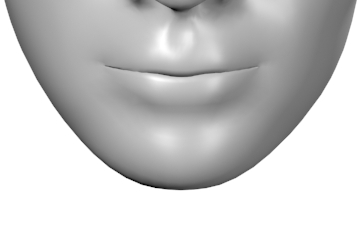
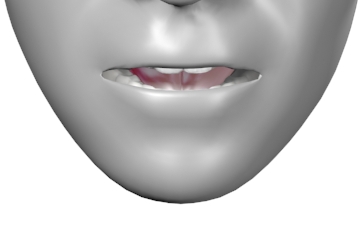
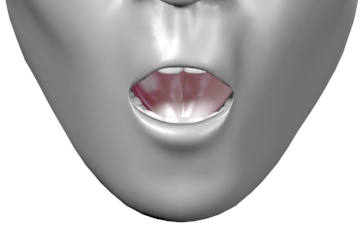
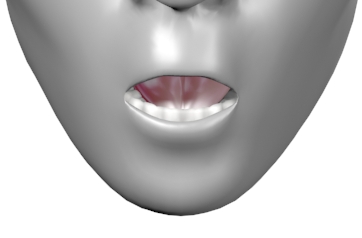
Visemes provide information regarding the mouth position and time interval of spoken audio which allows applications to visually pronounce audio.
This is accomplished by first retrieving audio from the iSpeech API (see section 2 for more details), then making a second request for an XML document which contains viseme information.
Example Transaction for Viseme Retrieval
HTTP GET network transaction to retrieve viseme positions
curl "http://api.ispeech.org/api/rest?action=viseme&text=hello+world"
Response
<visemes>
   <text>hello world</text>
   <voice>usenglishfemale</voice>
   <length>753</length>
   <frames>9</frames>
   <viseme>
      <start>1</start>
      <end>74</end>
      <index>1</index>
      <length>74</length>
      <mouth>12</mouth>
   </viseme>
   <viseme>
      <start>75</start>
      <end>102</end>
      <index>2</index>
      <length>28</length>
      <mouth>4</mouth>
   </viseme>
   <viseme>
      <start>103</start>
      <end>182</end>
      <index>3</index>
      <length>80</length>
      <mouth>14</mouth>
   </viseme>
   <viseme>
      <start>183</start>
      <end>269</end>
      <index>4</index>
      <length>87</length>
      <mouth>8</mouth>
   </viseme>
   <viseme>
      <start>270</start>
      <end>359</end>
      <index>5</index>
      <length>90</length>
      <mouth>7</mouth>
   </viseme>
   <viseme>
      <start>360</start>
      <end>470</end>
      <index>6</index>
      <length>111</length>
      <mouth>5</mouth>
   </viseme>
   <viseme>
      <start>471</start>
      <end>660</end>
      <index>7</index>
      <length>190</length>
      <mouth>14</mouth>
   </viseme>
   <viseme>
      <start>661</start>
      <end>752</end>
      <index>8</index>
      <length>92</length>
      <mouth>19</mouth>
   </viseme>
   <viseme>
      <start>753</start>
      <end>753</end>
      <index>9</index>
      <length>1</length>
      <mouth>0</mouth>
   </viseme>
</visemes>
To obtain viseme information from the iSpeech API, you query the server in the same manner as a normal text-to-speech request. The only difference between a TTS request and a marker request is the “action” parameter, which is set to “convert” for audio, and “viseme” for viseme information.
Viseme Chart
|
Mouth 0 |
|
|
|
|
Mouth 4 |
Mouth 5 |
Mouth 6 |
|
|
Mouth 8 |
Mouth 9 |
Mouth 10 |
Mouth 11 |
|
|
Mouth 13 |
Mouth 14 |
Mouth 15 |
|
Mouth 16 |
|
Mouth18 |
|
|
Mouth 20 |
Mouth 21 |
|
|


Viseme Usage Technique
Once you have obtained an audio file and the respective viseme information XML document, you are ready to animate mouth positions to simulate speaking.
There are many methods to processing iSpeech viseme information; the following outlines the most basic of those methods. Use the following steps as a baseline implementation.
Media Player Considerations
Your media player must support “location”, “position”, or must notify you of its current progress periodically. For example, in Flash, we set a timer to poll for the audio position every 250 milliseconds. Mouth positioning will be more accurate with a low interval.
Implementation
If your media player supports retrieval of “current position” or similar, you can follow these basic steps:
- Retrieve audio
- Retrieve viseme information xml
- Parse xml into enumerable container/object
- Load audio into media player and start playing
- Create a timer and set it’s interval to 250 milliseconds
- Inside of the newly created timer, at every interval query the media player’s current position
- Convert the position to milliseconds (if you have number such as 1.343, simply multiply by 1000)
- Move to first (or next) “word” node inside of marker information xml document
- Check to see if current position is greater than or equal to the value of ”start” AND ALSO current position is less than or equal to the value of “end”, highlight the specified “text”
- If current position is greater than “word” “end” value go to step 8
You can follow the above steps until the audio file is exhausted.
Notes
The same parameters must be sent in the viseme request as the original TTS audio request. For example, if you pass a “speed” parameter during audio conversion, you must also send this parameter in your marker information request. If you fail to do so, the viseme will not line up correctly.
File type affects audio length. A MP3 file is always longer than a WAV file due to compression padding. The API will modify the file length accordingly.
Errors
| Code | Summary |
|---|---|
| 1 | Invalid API key |
| 2 | Could not convert text |
| 3 | Not enough credits |
| 4 | No action specified |
| 5 | Invalid text |
| 6 | Too many words |
| 7 | Invalid text entry |
| 8 | Invalid voice |
| 12 | Invalid file format |
| 13 | Invalid speed |
| 14 | Invalid dictionary |
| 15 | Invalid bitrate |
| 16 | Invalid frequency |
| 29 | Viseme not supported for the selected voice. |
| 30 | Option not enabled for your account. Please contact iSpeech sales at +1 (917) 338-7723 or at sales@ispeech.org to modify your license. |
| 32 | Invalid pitch |
| 100 | This evaluation account has exceeded its trial period. Please contact iSpeech sales at +1 (917) 338-7723 or at sales@ispeech.org to upgrade your license. |
| 101 | Your key has been disabled. Please contact iSpeech sales at +1 (917) 338-7723 or at sales@ispeech.org to modify your license. |
| 997 | No api access |
| 998 | Unsupported output type |
| 999 | Invalid request |
| 1000 | Invalid Request Method POST Required |
Disclaimer
iSpeech Inc. (“iSpeech”) has made efforts to ensure the accuracy and completeness of the information in this document. However, iSpeech Inc. disclaims all representations, warranties and conditions, whether express or implied, arising by statute, operation of law, usage of trade, course of dealing or otherwise, with respect to the information contained herein. iSpeech Inc. assumes no liability to any party for any loss or damage, whether direct, indirect, incidental, consequential, special or exemplary, with respect to (a) the information; and/or (b) the evaluation, application or use of any product or service described herein.
iSpeech Inc. disclaims any and all representation that its products or services infringe upon any existing or future intellectual property rights. iSpeech Inc. owns and retains all right, title and interest in and to the iSpeech Inc. intellectual property, including without limitation, its patents, marks, copyrights and technology associated with the iSpeech Inc. services. No title or ownership of any of the foregoing is granted or otherwise transferred hereunder. iSpeech Inc. reserves the right to make changes to any information herein without further notice.
Revision History
| Publish Date | Updates |
|---|---|
| Aug 8, 2011 | Document created |
| Sept 13, 2011 | Added ASR |
| Sept 21, 2011 | Added AMR to ASR |
| Nov 9, 2011 | Added voice command examples |
| Nov 10, 2011 | Removed references to ASR Raw POST |
| Nov 11, 2011 | Made output variable explicit for ASR and voice list examples |
| Nov 17, 2011 | Specified HTTP POST/GET instead of REST, fixed /r/n typos |
| Nov 22, 2011 | Added reference for Speex in ASR content-type example |
| Dec 12, 2011 | Added endpadding and startpadding variables |
| Dec 12, 2011 | Added TTS examples, added background highlighting to emphasize examples |
| Aug 24, 2012 | Added position markers and visemes |
| Aug 24, 2012 | Added Flash, Javascript/Flash, Ruby, Python, Perl SDKs |
| Aug 24, 2012 | Added link to automated payment system |
| Aug 24, 2012 | Added pitch parameter to TTS |
| Aug 30, 2012 | Added standard non-freeform speech recognition models |
| Aug 30, 2012 | Added speech recognition speex modes |
| Sept 10, 2012 | Added bit depth |
| Sept 10, 2012 | Added TTS file formats: alaw, ulaw, vox, and mp4 |
| Sept 10, 2012 | Added errors |
| Sept 10, 2012 | Changed ASR language to locale |
| Oct 3, 2012 | Add filename parameter to TTS |
| Nov 12, 2012 | Removed eurdutchmale voice |
| Jan 22, 2013 | Added Math Markup Language (MathML) information and examples |
| Jan 24, 2013 | Added Speech Synthesis Markup Language (SSML) information and examples |
| Mar 4, 2013 | Corrected content-length for JSON TTS example |
| Mar 13, 2013 | Updated ASR locale list, added Web ASR freeform mode. |
| Sept 7, 2016 | Updated supported language list. |